Module 4.
Hello again. Today, we are learning more about using Python math libraries and loops.
Problem 1: Roots
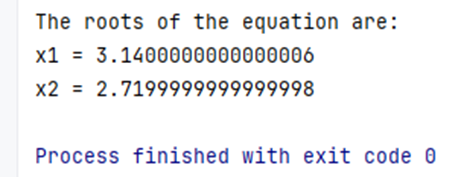
In this exercise, I used Python to solve a quadratic equation by applying the well-known formula from algebra. What made it especially fun was seeing how easily Python’s built-in math library handled the heavy lifting. From calculating the discriminant to taking the square root, I found myself needing a quick refresher to remember how the discriminant helps determine the nature of the roots, and Python made that rediscovery smooth and enjoyable. I followed the professor’s guidance closely and added some personal learning along the way, including the importance of using return instead of print inside a function. As the extra notes explain, print simply displays the result, while return gives the value back so it can be reused later.
Below is the Python code I used to solve the quadratic equation. It uses the classic formula from algebra and Python’s built-in math library to compute the roots cleanly and efficiently.
import math

#########Problem 1: Roots
# Let's identify the Coefficients
a = 1
b = -5.86
c = 8.5408

# Calculating the  Discriminant will help to determine quickly the nature of the solutions (roots)
discriminant = b**2 - 4 * a * c

# Check if the discriminant is non-negative
if discriminant >= 0:
    root1 = (-b + math.sqrt(discriminant)) / (2 * a)
    root2 = (-b - math.sqrt(discriminant)) / (2 * a)
    print()  ### Adding blank row
    print("The roots of the equation are:")
    print("x1 =", root1)
    print("x2 =", root2)
else:
    print("The equation has complex roots.")
Result
Problem 2: Reciprocals
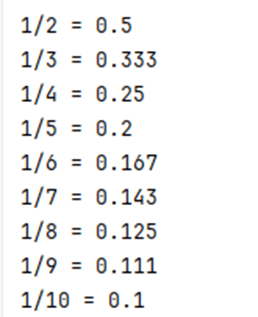
For this part of the assignment, I used a for loop to print the decimal values of the fractions 1/2 through 1/10. To keep things clean and readable, I rounded each result to three decimal places. I decided to take it one step further and turn the loop into a function. This made the code more flexible and reusable, and it gave me an excellent opportunity to practice what I learned about defining functions in Module 3. Using a function also allowed me to easily adjust the starting and ending values without rewriting the loop logic, a small change with a big payoff.
#######Problem 2: Reciprocals

print()  ### Adding blank row

def print_reciprocals(start, end):
    for i in range(start, end + 1):
        result = round(1.0 / i, 3)
        print(f"1/{i} = {result}")

# Call the function
print_reciprocals(2, 10)
Result
Learning how to work with loops, division, output formatting, and custom functions has made my Python journey even more exciting. I can’t wait to keep building on this strong foundation and exploring what else Python can do! 🤓
 Everyday Stat, Analytics & Python